Office automation system

Your whole office, automated.

Meentasks puts tasks, team chat, attendance and payroll, and a live view of your office in one place, then adds AI helpers that we train to keep it all running. We customize it to the way your team works.
  • Web, iPhone and Android
  • Customized dashboards
  • English and Arabic
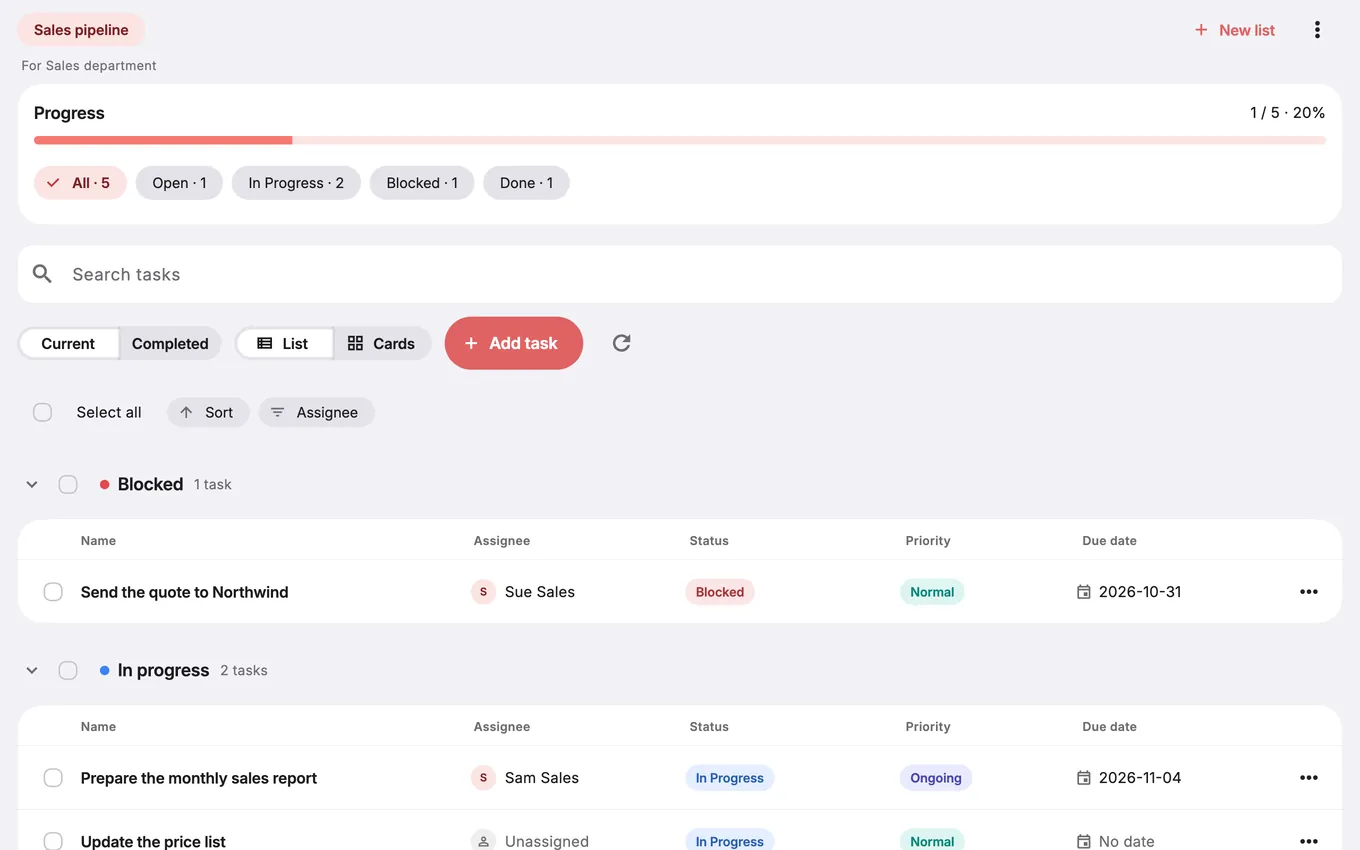
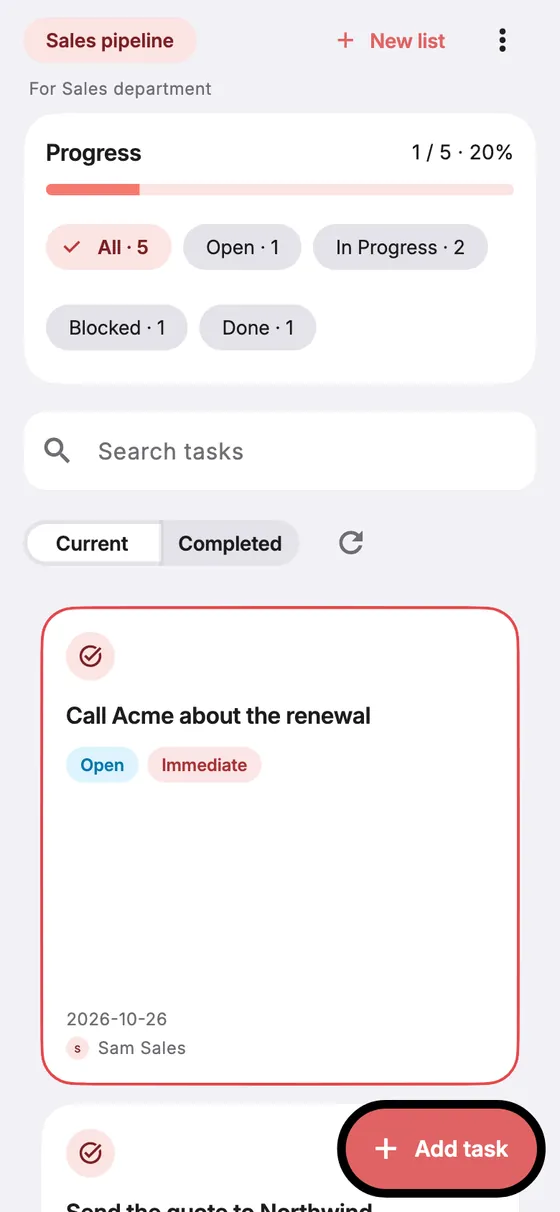
The Meentasks web app showing a Sales pipeline task board with progress, status filters and a list of tasks grouped by status
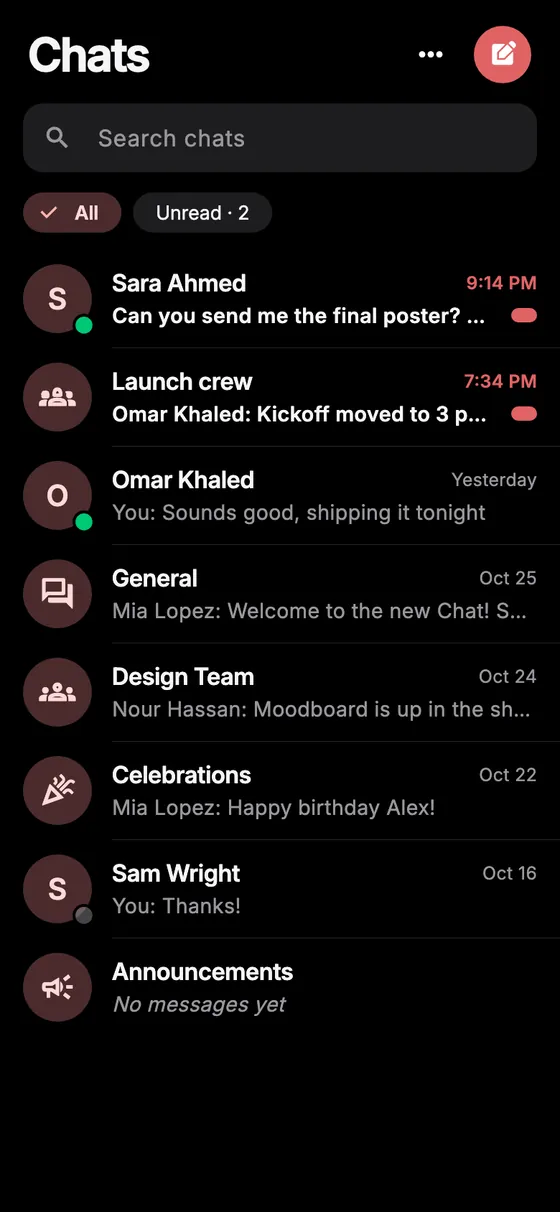
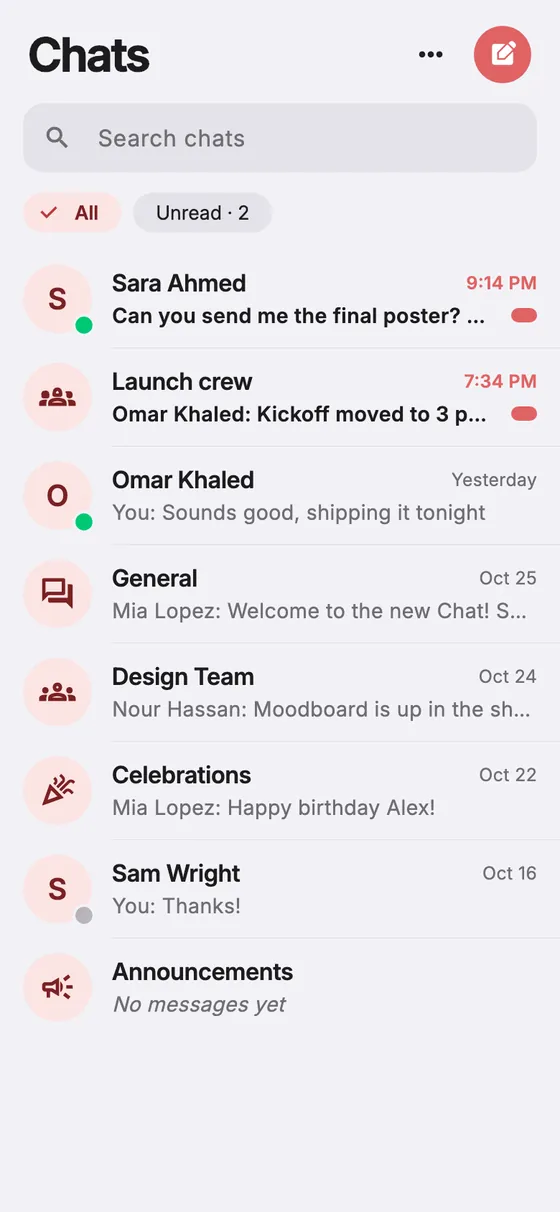
The Meentasks iPhone app showing a chat list with direct messages and team channels

One workspace for the office

Tasks, dashboards, chat, attendance, notifications and a live office floor, instead of a different tool for each.

Customized to your team

Anyone can use Meentasks. We set up your name, logo, colours, departments, roles and dashboards so it fits how you work.

AI that helps run it

We train AI helpers for your office: they join the team chat, show up on the office floor and take routine work off people.

What is inside

Everything the office runs on

A core workspace every team gets, plus modules you can switch on when you need them.

Tasks and dashboards

Task boards for each department or role, with list and card views, statuses, priorities, due dates and personal task lists. Dashboards are shaped around your team.

Team chat

Direct messages, group chats and department channels with attachments, reactions, voice notes, translate and online presence.

Attendance, points and payroll Add-on

Start and end shifts, pauses, time off, daily check-ins, points and payroll estimates in one place.

Office Live

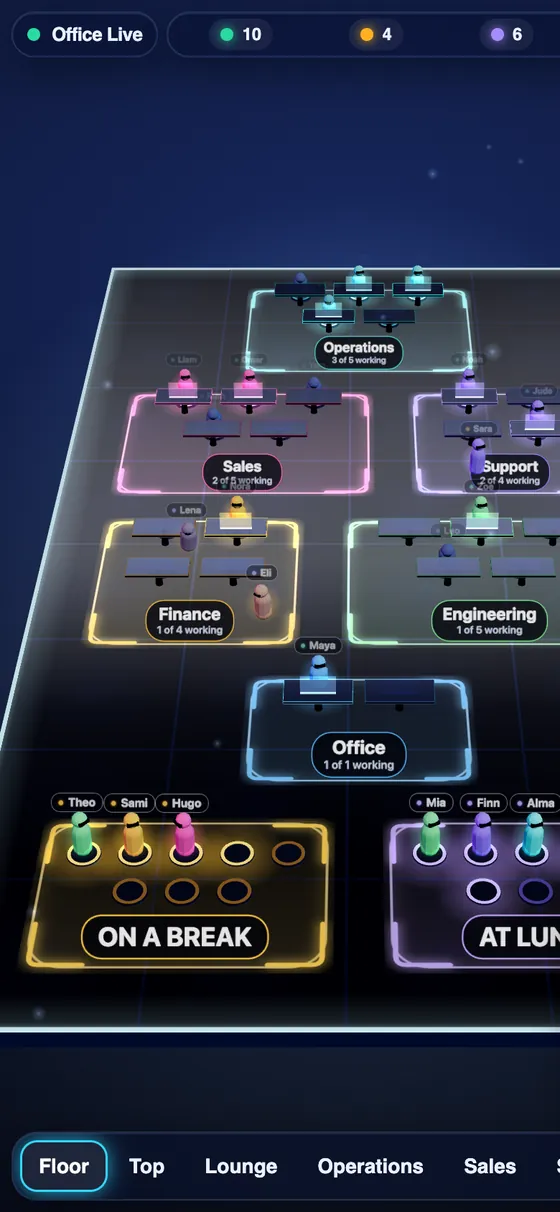
A live floor view of who is working, on a break or at lunch, grouped by department. Open it on a big screen in the office.

AI agents

AI helpers that post in team chat as clearly labelled agents and appear in Office Live with what they are working on.

Content and creator tools Add-on

Filming days and bookings, creators and deals, design and edit requests, and a news feed for teams that make content.

Notifications that reach people

Push notifications on iPhone and Android, alerts with sound and desktop notifications on the web, and widgets on the home screen.

Team pets

A bit of culture: shared eggs that hatch as people chat and help each other, with a leaderboard and visits between teammates.

English and Arabic

The app runs in English and Arabic, including right-to-left layout, with light and dark themes.

Office Live

See your office at a glance

A live floor that shows each department and who is working, on a break or at lunch. Put it on a screen in the office or open it in the app.
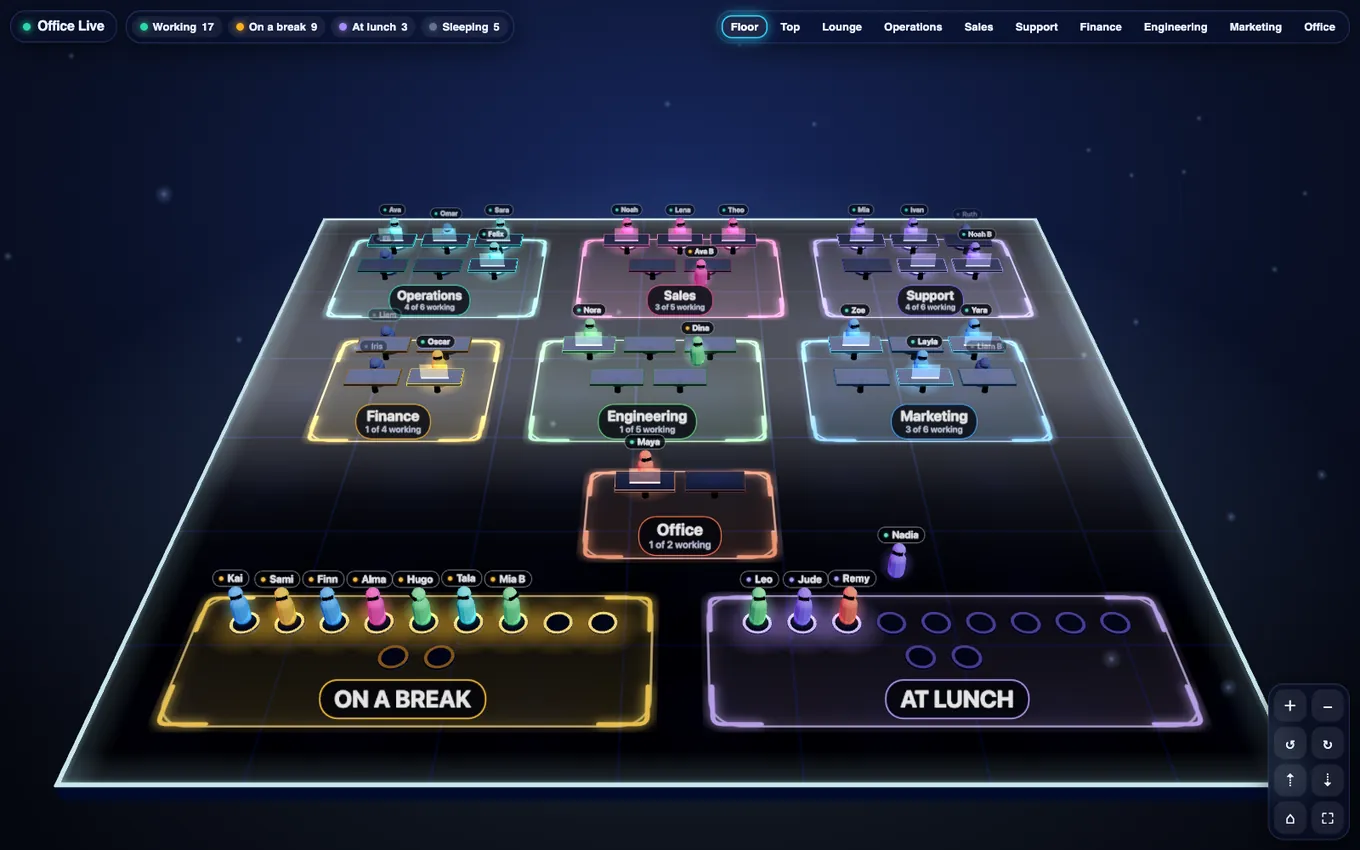
  • Grouped your way. Rooms follow your departments, so the floor matches your company.
  • AI agents have a seat too. The Agents Room shows each helper and whether it is working, idle or not connected.
  • Honest status. Agent states are what the agent last reported, with an expiry. Nothing is invented.
Office Live floor view: departments such as Operations, Sales and Support as glowing rooms with small people at desks, and On a break and At lunch areas below

Office Live floor with made-up demo people and departments.
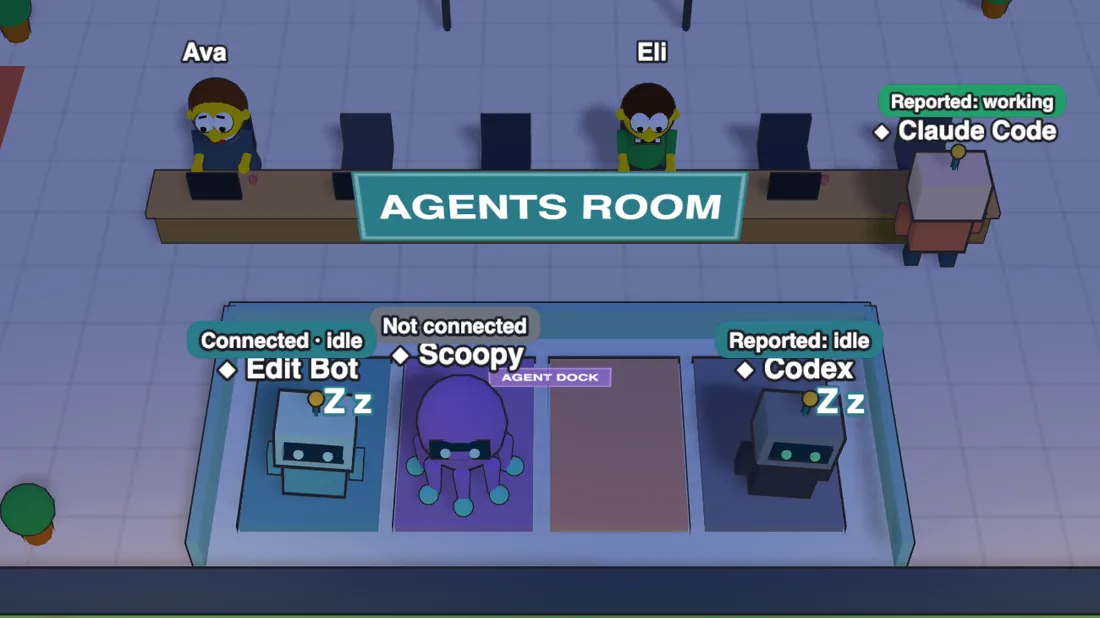
The Agents Room in Office Live with robots and an octopus named Edit Bot, Scoopy, Codex and Claude Code, each with a status label

The Agents Room: AI helpers with their status, shown with demo data.
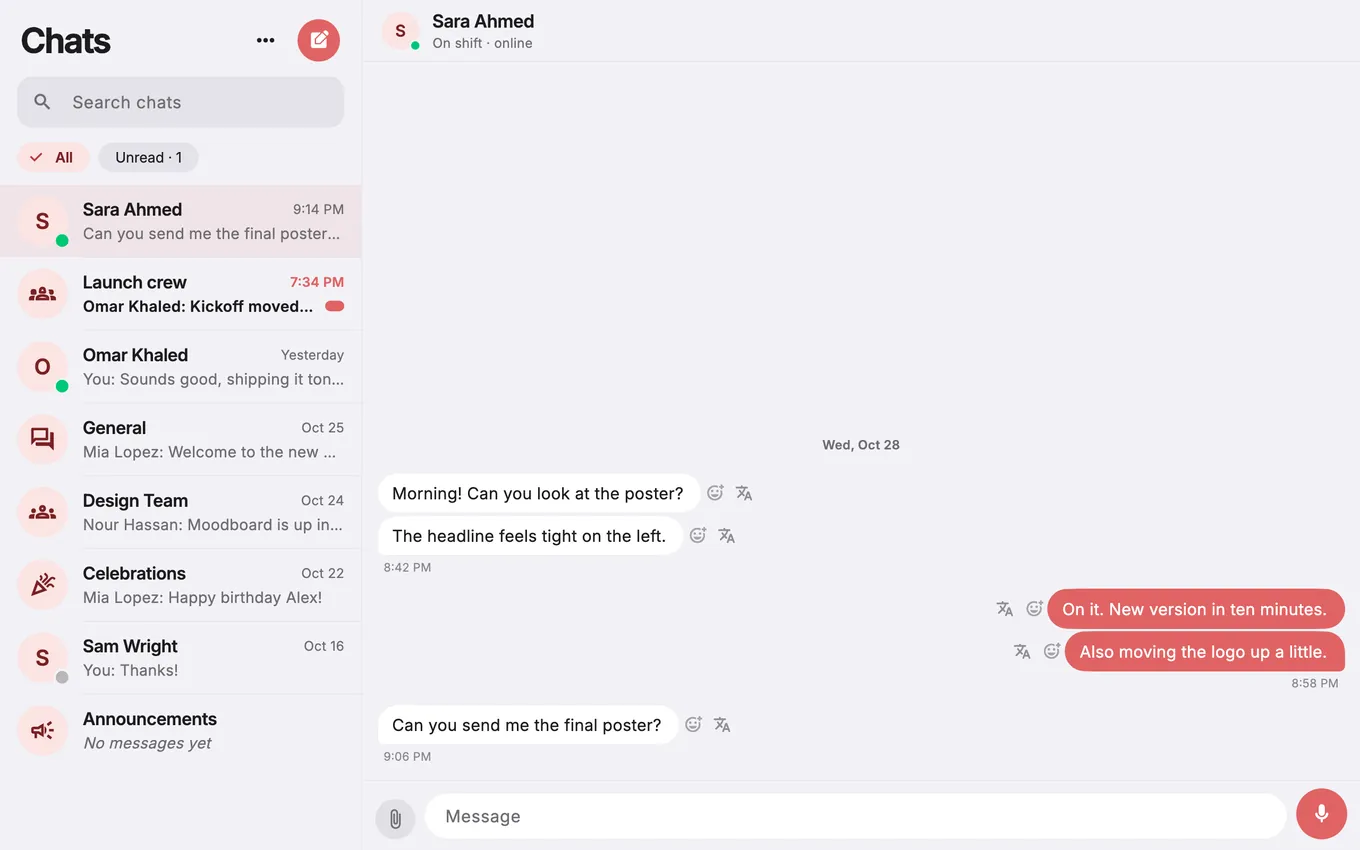
The Meentasks web app chat screen with a list of conversations on the left and a conversation on the right
AI for your office

We train AI to help run your office

Meentasks is an office automation system. Beyond the software, we set up and train AI helpers for the jobs in your office that repeat, so people spend their time on the work only people can do.

  • Helpers in your chat. An AI agent can post in team chat, tag people and be recognized by an AI label.
  • AI editing. Send plain-language instructions to an editing machine and get finished files back on the task. Add-on
  • Under your control. Admins create and revoke an agent's keys, and an agent only reaches the rooms it is given.
Web, iPhone and Android

One app, on every device your team uses

The same workspace in a browser and in native apps for iPhone and Android, with widgets and watch apps that keep today's tasks in view.
Web Any browser
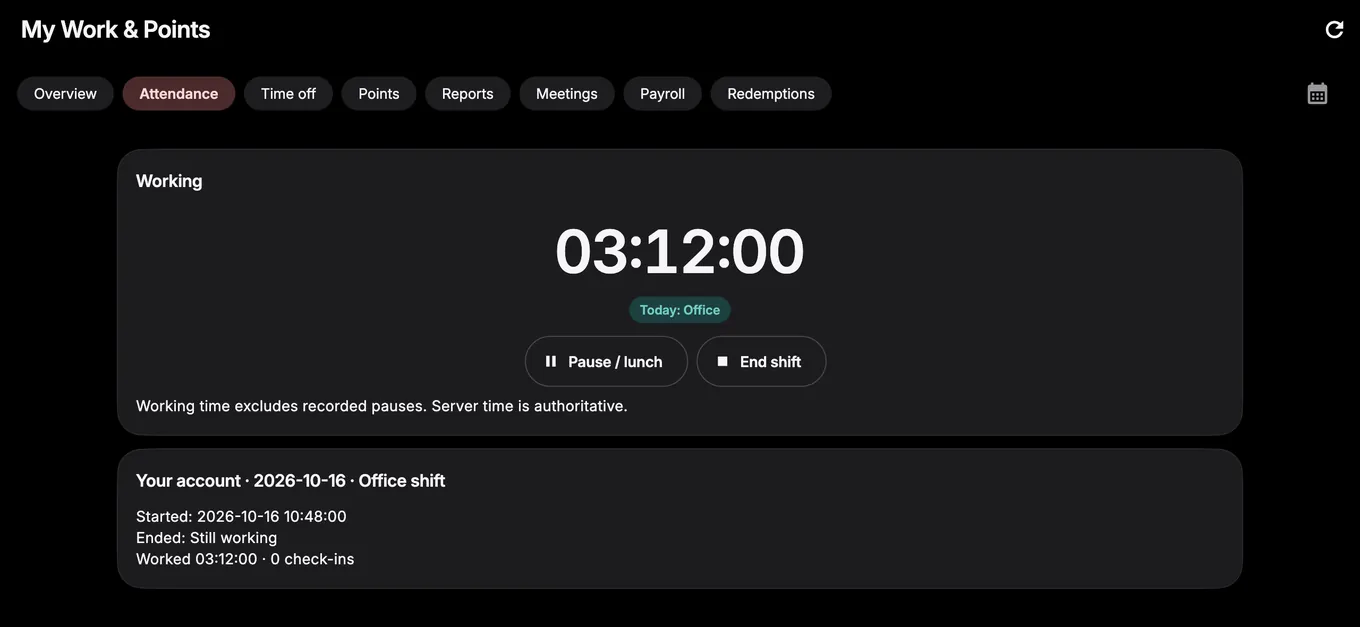
The Meentasks web app in dark mode showing the My Work and Points screen with an attendance tab, ready to start a shift
iPhone iOS
iPhone screen: a task board with progress and status filters
Task boards
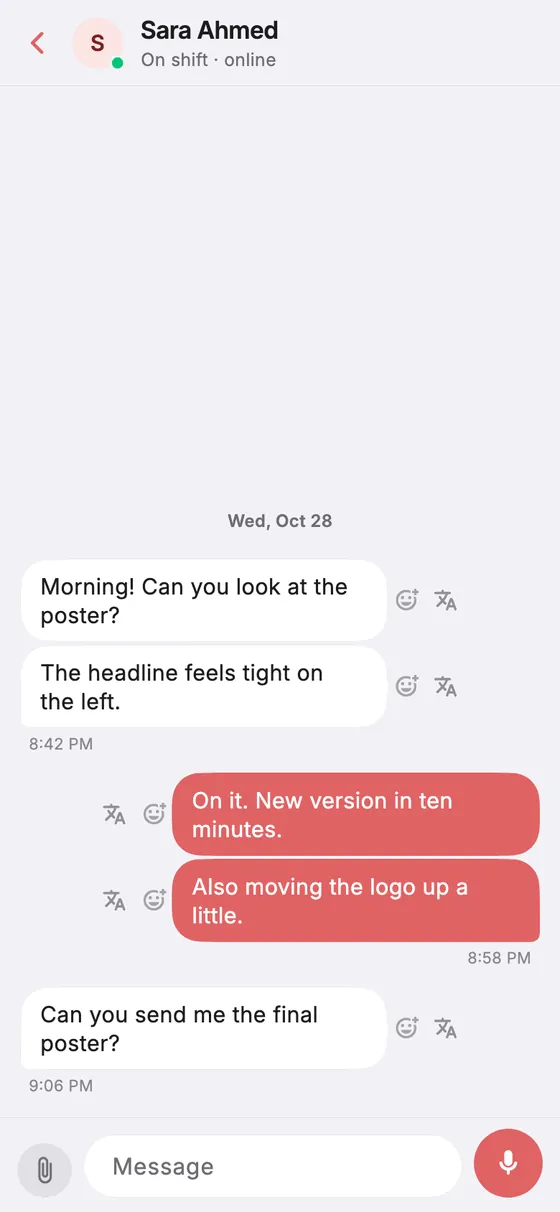
iPhone screen: a chat conversation with message bubbles
Team chat
Office Live
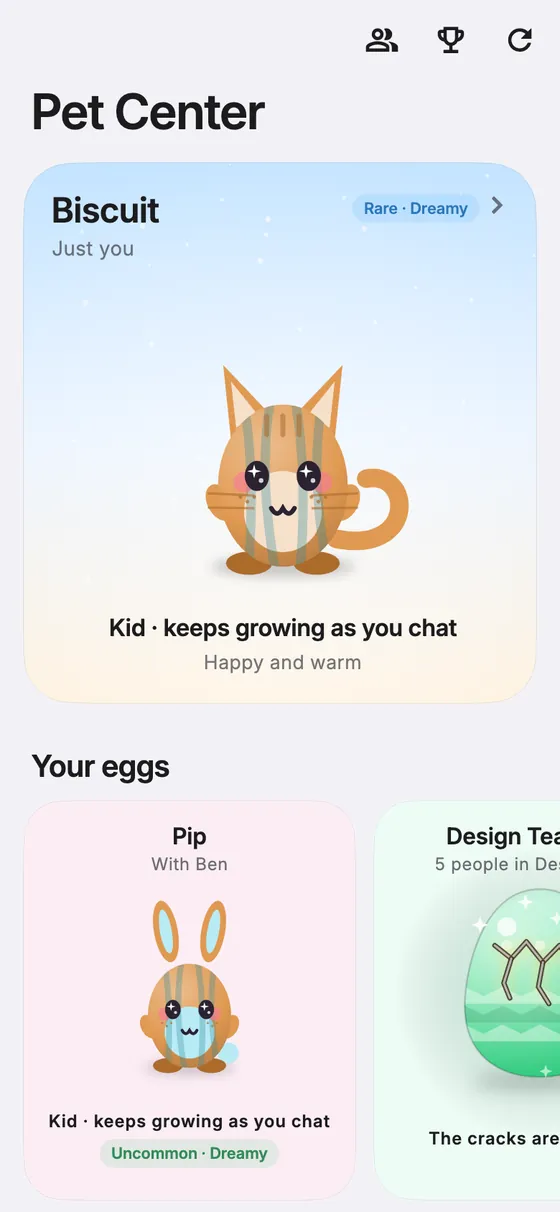
iPhone screen: the Pet Center with a cat and shared eggs
Team pets
Android Light and dark
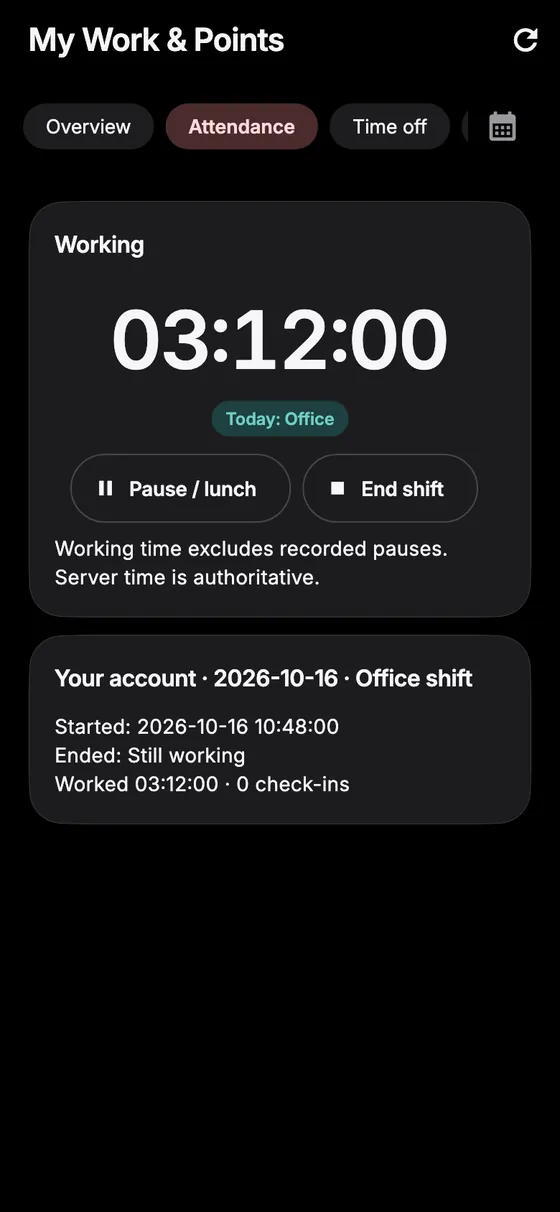
Android screen in dark theme: a running shift timer with pause and end shift buttons
Attendance
Android screen in dark theme: the chat list
Chat
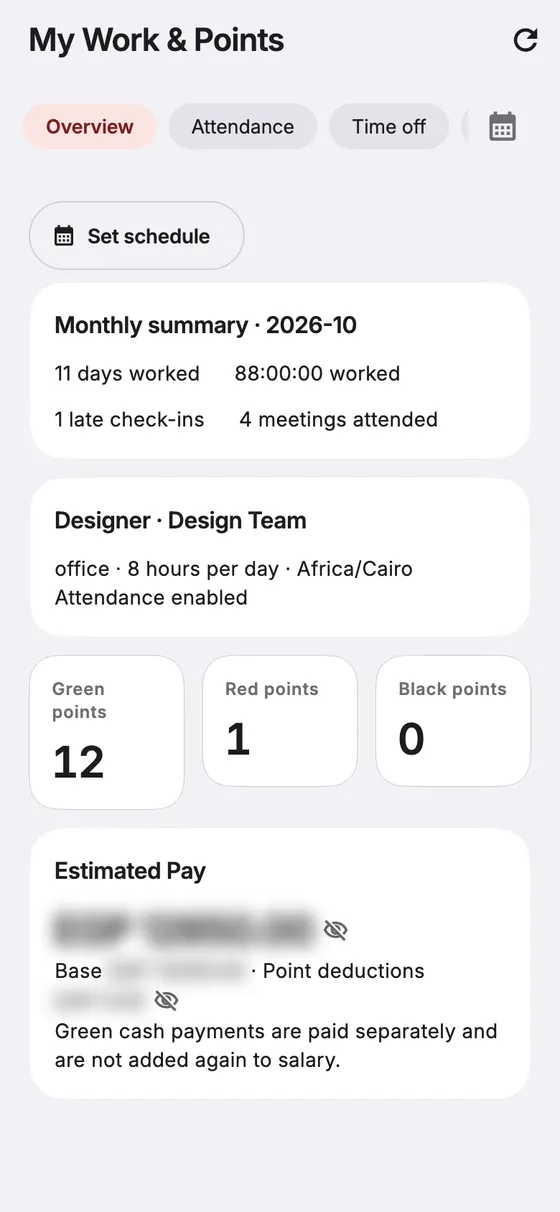
Android screen: monthly summary, points and estimated pay
Points and pay
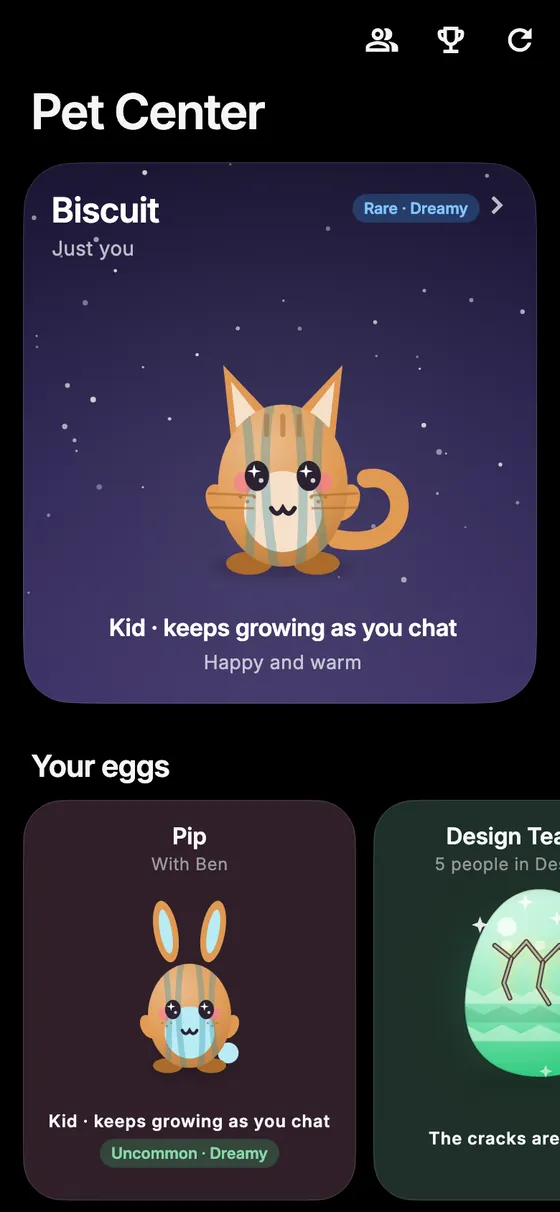
Android screen in dark theme: the Pet Center
Team pets

The app screens on this page are real renders of the Meentasks app with made-up demo data, shown inside device frames. iPhone and Android share one app, so they are not separate per-device captures.

Widgets and watch

On your home screen and your wrist

Your due tasks, your next booking and your latest notifications, kept in sync from the phone app. No need to open anything to see what is next.

iPhone widgets

Small, medium and large Home Screen widgets for tasks due, next booking and notifications.

Apple Watch

A watch app plus watch-face complications (circular, rectangular and inline).

Android and Wear OS

A resizable home-screen widget, and a Wear OS app for the watch.

Illustration drawn from the layouts of the widget and watch code in the app. These are not captures from a device. The web app does not have widgets; it uses in-browser alerts instead.

How it works

We do the set-up, you run your office

You do not have to configure anything yourself. Tell us how your office runs and we build around it.

  1. Tell us how you work

    Your teams, roles, routines and the jobs that eat people's time.

  2. We customize your dashboards

    Your name, logo and colours, your departments and roles, and the task boards and modules your team needs.

  3. We train AI helpers

    Agents for the repeating work, connected to your chat and your tasks, visible on the office floor.

  4. You run it, we manage it

    Invite your team on web, iPhone and Android. We keep it running and add modules as you grow.

Custom solutions

Anyone can use it. We make it yours.

Meentasks is not a one-size-fits-all template. Every customer gets their own separate copy, with their own database and settings, shaped to their company.

Name and logoBrand colourDepartmentsRoles and permissionsTask boardsModulesPlatforms

Start simple, add what you need

  • Blank, simple set-up. Your own roles, your own departments and task boards for each team.
  • Modules when you want them. Attendance, points and payroll, content and creator tools, AI editing and more.
  • Built for your case. Have a process nobody covers? We can build a custom solution for it.
  • Your data stays separate. One company per deployment, not shared with anyone else.
Plans

Simple plans

Start free. Let us host it if you prefer. Add modules when they pay off.

Free

You host it. We set it up and manage it.

Free
  • Tasks, dashboards and team chat
  • Runs on your own hosting account
  • We set it up and manage it
  • Your name, logo and colours
  • Web, iPhone and Android
Start free
Hands-off

Hosted

We host it for you for a monthly fee.

Contact usper month
  • Everything in Free
  • We host and run it for you
  • Your own separate copy and database
  • On your own domain
  • No servers or accounts to look after
Get hosted

Upgrades

Paid modules you add to Free or Hosted.

Contact us
  • Attendance, points and payroll
  • Content and creator tools
  • AI editing
  • AI helpers trained for your office
  • Custom solutions built for you
Ask about upgrades

Not sure which fits? Tell us what you want to automate and we will recommend a set-up.

FAQ

Questions, answered

What is Meentasks?
An office automation system. It brings tasks, team chat, attendance and payroll, notifications and a live office view into one workspace, and adds AI helpers that take over routine work. It runs on the web, iPhone and Android.
Who can use it?
Any team. Meentasks started as a workspace for a content agency, and every customer now starts from a blank, simple set-up that we customize: your roles, your departments, your task boards and your branding.
What does the Free plan mean?
The software is free. You host it on your own hosting account, and we set it up and manage it for you. You only pay if you add upgrades.
What does Hosted mean?
We host it for you for a monthly fee, so there is no hosting account for you to create or look after. Your company still gets its own separate copy and database.
What are upgrades?
Paid modules you switch on when you need them: attendance, points and payroll; content and creator tools; AI editing; and custom solutions built for your case. Pricing is on request.
Can you train AI for our office?
Yes. We set up AI helpers for the repeating jobs in your office and connect them to your team chat and tasks. They are clearly labelled as AI, they appear on the Office Live floor, and your admins control what they can reach.
Which devices and languages are supported?
Web in a browser, iPhone and Android. The app is available in English and Arabic, with light and dark themes. There are home-screen widgets and watch apps for iPhone/Apple Watch and Android/Wear OS.
Do I need my own Apple or Google account for the apps?
For branded phone apps, yes. Android apps are built for you. iPhone apps are published under your own Apple Developer account, and we guide you through that. The web app needs no accounts at all.
Is my data shared with other customers?
No. Each customer has a separate copy of the app with its own database and file storage and its own secrets.
How do I get started?
Use the sign-up form and tell us about your team and what you want to automate. We will get back to you to plan the set-up.

Let's automate your office

Tell us how your team works and what you would like to hand off. We will set up Meentasks around it.